Showing posts with label facebook. Show all posts

Wednesday, May 15, 2019

How Using Video Can Help You Reach Your Audience


Are you as surprised as I am about these stats? Granted, it’s not as surprising that people, on average, spend over 5 hours per day watching TV, but did you know that YouTube is the third largest search engine on the planet? I’m still not sure why people watch videos with the sound turned off, but yes, YouTube is the third largest search engine behind Google and Bing.

What do these stats mean? The first three social media stats are evidence to me that people like interacting with one other. The video stats are proof that people like to watch videos. So, as speakers, if we want to get ourselves in front of more people, it sounds like video is a great way to do it. I’ll bet you agree, but the thought of standing in front of a camera can be scarier than the thought standing in front of an audience!

Please know that I’m not saying that you have to do videos. What I am suggesting is that while you are continuing to build your platform, getting used to using video is going to provide you with another way to reach your audience. In addition, it may even provide advantages you might not have even thought about, such as:


1. Video gives people a more personal way to get to know you beyond your bio, headshot, and/or website because they get to “meet” you on screen.

2.  Short-and-sweet videos between 1 and 3 minutes provide you with a chance to share content while also showing off your subject matter expertise.

3.  Best of all, in addition to being visible evidence that you can speak to an audience, because you’re posting your videos on one or more social media platforms, it’s visible evidence you'll now have to share with event planners, meeting coordinators, etc., who are looking for new speakers!

I realize that seriously considering video opens up a Pandora’s box full of new questions, such as what platform to use, how to do it, etc. But my purpose here is simply to be informative, NOT to overwhelm you, so I’ll offer you two simple how-to get started thoughts.  

Don’t think that you have to conquer video in one sitting. Instead, take small steps. Come up with one thought, idea, point, tip, or strategy that you can cover in a couple of minutes. Turn on your cell phone and record yourself talking it through. Each time you make a mistake, stop recording, erase it, and start over. Keep taping yourself talking until you’re comfortable.

Once you’re comfortable, figure out which social media channel you’d like to start with. It’ll probably make sense to start with the one you frequent the most, right?

Trust me, you’re not alone if you’re nervous about videotaping yourself. I’m very nervous about it, but I’m working on doing it! So let’s challenge ourselves together. Who knows... one of these days you might get a video newsletter along with my written words!


Authored by guest blogger:  Beth Stoller

Beth Stoller is a relationship-driven person who has a passion for helping people step into their roles as speakers and leaders. In 2014, she combined her savvy organization and logistics skills with her talent for networking and established her speaker’s business, At the Podium, LLC. In 2019, she started ATP’s Business Professionals Speaker Mastermind Group which meets the 2nd Saturday every month.“Speakers can change people’s lives for the better in a moment. That’s one of the reasons I love my work. I get to help business professionals, whether they’re aspiring or seasoned speakers, prepare for and create those moments!” 

Beth has an absolute belief that everyone has gifts, talents, skills, experiences, knowledge, stories, and/or special messages to share. “When knowledgeable professionals start sharing their expertise from the stage, we all benefit.”

On a personal note, Beth resides in Trumbull, CT, where she lives with her husband, her son, and their dog Poncho. When Beth’s not working on At the Podium, she pursues other passions which include bookkeeping, tennis, photography, and hanging out with family and friends. Occasionally, you might also see her attempting to hit that little white ball around a golf course (it’s a networking thing).  www.atthepodium.biz


Thursday, March 31, 2016

Facebook Page Tips to Organically Improve Reach and Engagement

With 1.59 billion users on Facebook, marketers want to make the most of their Pages and promote their businesses effectively. We're all competing for users' attention and although your Page's overall organic reach has probably declined, there are ways to make the most of your unpaid posts with some simple tips:
  • Like, Comment and Share often
  • Include @tag of other relevant Pages in your posts to extend your reach (business partners, customers, etc.)
  • @Tag individuals in the Comments
  • Post more video
  • Mix up post types: images, memes, text only, questions, article links
  • Post pics of staff so followers can get to know you better
  • Post outside of business hours (evenings, Saturday and Sunday)
  • Post when the majority of your fans are online (refer to FB Insights)
  • Use a Call to Action in posts ("Tell us in the Comments", "Click Like if you...", "Please share")
  • Plan and arrange all of your upcoming posts using Facebook Scheduler.
  • Update the FB Cover Photo to reflect current campaign and upcoming 
  • Create events on FB and invite all followers
    • One to two months ahead of engagement, post who, what, when, and why info and links to web pages with details and registrations info
  • Build community: Ask Fans to share their photos on your Page
For help with your Facebook Page or other social media, contact Jocelyn Murray at 203.377.9980.

Sunday, December 13, 2015

Mari Smith's 2016 Facebook Tips and Trends


Facebook marketing expert, Mari Smith, recently offered some great Facebook tips and trends to look for in 2016 during her presentation at the Inbound conference in Boston. Here are a few useful pieces of information that I took away:

1.  Mari discussed three critical Facebook trends:
  •  Facebook is disrupting TV and video. Will Facebook overtake YouTube? As of September 2014, Facebook's share of video posts was approaching YouTube's.  The new Facebook Live is a live-streaming feature that's only available to celebrity Pages right now. Strategize how to use live video for your business.
  • There will be a stronger emphasis on Messenger for Business. Facebook predicts that businesses will be using Messenger for all kinds of customer communication and transactions. Messenger will essentially serve as an inbox to connect with customers.
  •  Brand storytelling: Use Facebook to put the spotlight on your customers, to feature case studies, to use video, and to be more "people centric".

2. Mari also focused on Facebook marketing mistakes that businesses are making:
  •  Making posts overly promotional
  •  Targeting the wrong audience
  • Using only the Boost button
  • Promoting posts without a measurable ROI
  • Not having an effective landing page to tie in with your ads
  • Advertising without using a tracking pixel

3. Regarding content and engagement, Mari recommends that your posts either entertain, inform or prompt a call to action. Here are a few of her common sense content tips:
  •  Personalize your posts (write in first person when possible)
  •  Address people who comment by name
  • Use humor
  • Always be prompt in responding to comments/questions

4. While organic reach is on the decline, here are some ways to maximize it:
  •  Post more native video
  •  Try posting outside business hours
  • Mix up post types and post lengths
  • Repost popular posts
  • Include "@" tags of other Pages
  • Drive traffic from other sources
  • Embed posts and videos in your blog
Are you using any of these techniques effectively? What other trends do you see on Facebook?

Thursday, September 17, 2015

Facebook Adds 'Donate Now' Button for Charities

Last month, Facebook added a "Donate Now" option for non-profit Pages' Call to Action button and linked advertisements.This is a useful tool for non-profits to lead social media visitors directly to their websites to take action and become donors.


According to Facebook, " Now, it's easier than ever for nonprofits to connect with people who care about their causes and encourage them to contribute through the website of their choice."

When visitors click on the "Donate Now" button, a Facebook message alerts them to the fact that they're not affiliated with and don't endorse the organization. Then visitors can continue on to an external site where donations can be made.

Non-profits and charities can also run Facebook ads with the Donate Now button as part of any campaign.


For easy step by step instructions on how to post the 'Donate Now' button, click here.

Monday, January 5, 2015

Facebook 2015 Mistakes to Avoid

Last month, I blogged about Mari Smith's Facebook 2015 webinar which revealed predictions for trends on Pages. This post will cover Mari's recommended mistakes to avoid on Facebook in the coming year.

Don't make these Facebook errors:

1.  Posts are all the same
Vary your posts to keep your audience interested! Try a combination of videos, links, images, funny quotes, relevant news and quirky news that all work toward your social media goals.

2.  Not responding to fan comments
When fans and followers comment or ask a questions, it's important to respond promptly. Monitor your account often so you can reply or take action as needed.

3.  Advertising to existing customers
When promoting an event or product/service, be sure to filter out attendees or clients. This is an advanced advertising feature that's worth learning.

4.  Ad frequency overdone
Don't run the risk of having people "unfollow" your page! Avoid having your ad shown more than 1-2 times to the same audience. Check your frequency report to see how many times your ad was shown to avoid over exposure.

5.  Not integrating Facebook with other channels
While you probably have a Facebook icon on your web site that links to your Facebook Page, have you considered embedding a 'Like Box' so visitors can click and Like right from your Page? Drive your email lists and other social media network followers to your Facebook Page and vice versa.

6.  Quitting Facebook
Keeping up with the myriad of Facebook changes can be frustrating but don't give up on the platform. While its organic reach has dwindled, Facebook does offer an inexpensive advertising entry point that can be used to find new prospects and customers for your business.

As always, if you need assistance with your Facebook or other social media, please give me a shout!

Wednesday, December 10, 2014

Facebook Trends for 2015

As we close out 2014 and solidify business plans for 2015, you may be considering how to improve your social media marketing in the new year. In her recent Facebook 2015 webinar, Mari Smith, a leading expert and trainer on Facebook best practices, revealed growing trends for Pages in the new year. Here's a summary of the trends she discussed:

1. Post More Video vs. Static Photos
Videos are shared twelve times more often than photos or links on Facebook.  Show off your expertise, products, services or just your personality! Consider how you can incorporate educational, informational or entertaining videos into your social media strategy.

2. Business Pages: Post More Links
Not long ago, links were out of favor with Facebook.  Now native links are being given priority! Pasting a url into the Facebook status box will automatically create a post that will grab that page's headline, photo and description.  Post those links and drive more Facebook traffic to your blog  and web site pages!

3. Focus on Adding Value
Smith suggests that the best use of Facebook is to engage a small, targeted, engaged community. How can you add more value to a highly focused audience?

4. More Personal and Personalized Content
Consider how you can personalize your brand to make stronger connections with clients and prospects. Smith suggests posting selfies, short videos about employees or interesting 'behind the scenes' content. How can you tell your story in order to add value for your target market?

5. Facebook Advertising
Facebook's ad-related services provide a way to reach a targeted segment with a customized message at a budget that you determine.  Expand your audience by allocating funds for Facebook's targeted advertising.

6. Better Ad Targeting
Facebook will now use login data to allow marketers to track users' activity on the Web. Facebook hasn't disclosed all the details but this new ad platform will help marketers make ads relevant to the right people.

7. More Creative Facebook Integration
While you probably have a Facebook icon on your web site that links to your Facebook Page, have you considered embedding a 'Like Box' so visitors can click and Like right from your Page? 

8. Organic Reach
94% of your Facebook Fans don't see your content. Ouch! Smith says that in order to increase your reach try mixing things up! Test posting outside business hours, mix up post frequency (try posting less), test post length, include @tags of other pages and repost your most popular posts.

9. Free Content
Smith notes that one of the biggest marketing trend is to capture leads by giving away low end content  such as free webinars, white papers, reports, etc. on Facebook.  Then create a campaign to turn those captured leads into new customers!

So those are Mari Smith's Facebook Trends for 2015 in a nutshell!  Tune in for my next blog post on Mari Smith's Facebook Mistakes to Avoid!

As always, if you need assistance with your Facebook or other social media, please give me a shout or stop by www.marketing-er.com!

Monday, August 25, 2014

Looking to Improve Your Facebook Page Productivity?

Track and Measure Your FaceBook Page Activity with Insights

All Facebook Page owners/administrators should be familiar with Insights, data that Facebook provides about your Page's activity that can help drive strategic marketing decisions. Page Insights (found in the white bar across the top of the administrator's Page) can help determine how the audience interacts with your Facebook Page. Utilizing the information provided by Page Insights is vital for creating a successful Facebook Page. Insights will allow you to reach your target audience, garner traffic on your page, and help produce business.

Facebook's Insights provide the following information:

1)     See a metrics summary to analyze how well the page is performing.
2)      Learn which posts are more popular with your audience. This helps guide you to create similar posts that will receive the same positive feedback.
3)      Track when your audience is logged into Facebook so that posts can be published during hours that demonstrate optimal page traffic.

Page Insights are only available after at least 30 people have liked your page.

Here's a detailed breakdown of all the tabs within Insights:

·         Overview  
The purpose of this tab is to show as much data as possible about your Page at a glimpse. The Overview tab includes a percentage graph of Likes, Post Reach, and Engagement within the last seven days. The table underneath the graph shows the most recent published posts alongside some statistics about those posts. The “pages to watch” table allows one to monitor the growth of other Pages including any competitors.


·         Likes
This tab illustrates the fan growth of your Facebook Page. It can be viewed weekly, monthly, or quarterly. The graph for “total pages Likes” lets the page administrator see the number of Likes received on any particular date. The “net Likes” graph show how the Likes received on a page change daily. Both graphs can help one measure whether the Page is growing at steady rate or declining. One can also see where page Likes come from: your own Page, Page suggestions, other people’s posts or ads.

·         Reach
The Reach tab shows the number of people who have received posts from your Facebook Page. Stats reflect the number of times a post was displayed and whether it was clicked on or not. Reaches can derive from organic or paid sources (organic means that posts were shown through unpaid distribution and paid are posts shown by ads). This tab lets you evaluate positive actions such as likes, comments, and shares as well as negative actions such as when your posts are hidden, reported as spam, and when people unlike your Page.


The Total Reach graph shows all the activity related to your Page such as posts, the post of others about your Page, ads, mentions, and checkins. In all, this tab shows the all around activity of your Page and what works best to spur on interaction with your followers.

·         Visits
This tab allows you to see how people are interacting with your Page by understanding the areas of your Page that were visited the most(Timeline, Photos, Info, etc.).

The Other Page Activity graph shows all mentions, other individuals’ posts on your Page, any check-ins and offer purchases.

'External Referrers' shows which web sites are driving traffic to your Facebook Page.

·         Posts
Within the Post tab there are total of three sub-tabs. The very first tab shows the days of the week and times of the day when your Facebook page fans are online. This is great data to ensure that you're scheduling posts when your audience will see them.

The Post Types tab shows the level of Reach and Engagement for each post so you can evaluate what worked and what did not.

The last tab shows top posts from the Pages You Watch (competition?) so you can easily keep track of what's working for other Pages.


·         People  
To find out if your Facebook fans match up with the profile of your target market, check out the People tab. Demographics including age, gender and location are shown and the tab displays the people your Page's content reaches and engages.


Facebook Insights is a smart, free tool that helps Page administrators better understand what their business Page is accomplishing. Use it to track trends and to improve your Page's success moving forward.  

Tuesday, June 10, 2014

Market your Business with Facebook Offers

Businesses can share discounts and coupons with their prospects and customers by posting an Offer on their Facebook Page.  Offers are a great way for small businesses to engage with existing or new audiences to drive sales.  Your Page must have at least 50 Likes in order to create an Offer.

Facebook suggests that you should carefully consider your Offer's value, headline and the image you use. If people don’t understand your offer or think it looks like spam, they might hide it from News Feed, mark it as spam or unlike your Page.

Sample Facebook Offers

Offers used to be only available to brick and mortar businesses but now any business can use them.  Here's a sample discount offer from Macy's that you may have seen in your News Feed:


When someone claims an offer, they'll receive an email in their Inbox about it.

Use an Offer to promote a FREE giveaway in exchange for users’ email address. This offer directs people to a custom landing page that allows users to enter their email in order to get the PDF download.


How to Create a Facebook Offer

Go to the status update box on your Facebook Page and choose Offer.

1. Create a Title and Description for your Offer

2. Add an Image

3. Set the Offer's expiration date and any limit on the number of Offers you want to make available.

4. Choose your audience. Click "Not Now"  and your offer will appear on your Page to your Fans only. Or choose a dollar amount and your Offer will appear to a new custom audience (specify location, gender, age or interests).


The more Likes, Shares and comments your Offer gets, the more likely it is to show up in the News Feed.  Happy "Offer"ing!


Wednesday, April 2, 2014

Social Media Marketing World 2014 Trends and Takeaways

Facebook took a big hit this week.  The keynote speaker at this week's Social Media Marketing World 2014 Conference diminished Facebook in his opening remarks essentially saying "Blog more, Facebook less".

Many businesses have been thoroughly frustrated with their efforts to gain more traction on Facebook.  Status updates are seen by a shrinking percentage of followers and the only way to get any visibility is to pay for exposure.

According to content marketing writer, Ryan Hanley, who was at the Conference, "Facebook, the social media juggernaut, minimized at the largest social media marketing conference in world, in the opening keynote no less."

Conference keynote and founder Michael Stelzner may have minimized Facebook but what he did emphasize was the importance of blogging, Google+ and producing relevant content. Sharing information, answering client/prospect questions and serving as an online resource should be part of your business' marketing purpose.

For those of who weren't able to attend SMMW 14, check out Ryan's blog about the trends and takeaways that he discovered: www.ryanhanley.com

Tuesday, December 17, 2013

Facebook's New Embedded Post Feature

Have you used Facebook's new embedded post feature? I've embedded a post from social media expert Mari Smith below. Embedding posts into your blog or web site is a great way to easily add new content!


Monday, September 30, 2013

Need More Fans to See Your Facebook Posts?


While Facebook often changes the factors that determine what's seen in the NewsFeed, the bottom line is that if no one interacts on your Page it won't get much NewsFeed visibility.

So what are the best ways to make your Page active and maximize your posts' effectiveness?

1.Pay Attention to EdgeRank

 According to Facebook's recent announcement, they've changed the NewsFeed EdgeRank algorithm based these factors: whether or not people "hide" your content, if your Fans overlap with those of other high quality Pages and if your content is Shared often. Facebook is encouraging Pages to consistently produce interesting content that your audience responds to so keep this in mind when you post.

2. Experiment with Paid Features on Facebook

Use Promoted Posts and Sponsored Stories to increase visibility and interaction of your posts. For a small fee (as low as $5) you can use Promoted Posts to ensure that a greater number of your fans and their friends will see a specific post.


With Sponsored Stories, you can pay to highlight something that happened on your Page. The most common Sponsored Stories are Page Like announcements, Offer Claims or Check-Ins. For instance, Bath & Body Works did a Sponsored Story to highlight that a Fan took advantage of their Free Aromatherapy Lotion offer. The goal of Sponsored Stories is to get more of your Fans to take the same action.

3. Use Photos

Recent research says that there's more fan engagement from photos than videos, links or text. Try including a photo with every post and see if your stats go up.  If you don't have a photo, try using a cartoon/caption for Someecards or other humorous e-card sites.


Thursday, August 15, 2013

fortune 500 2013


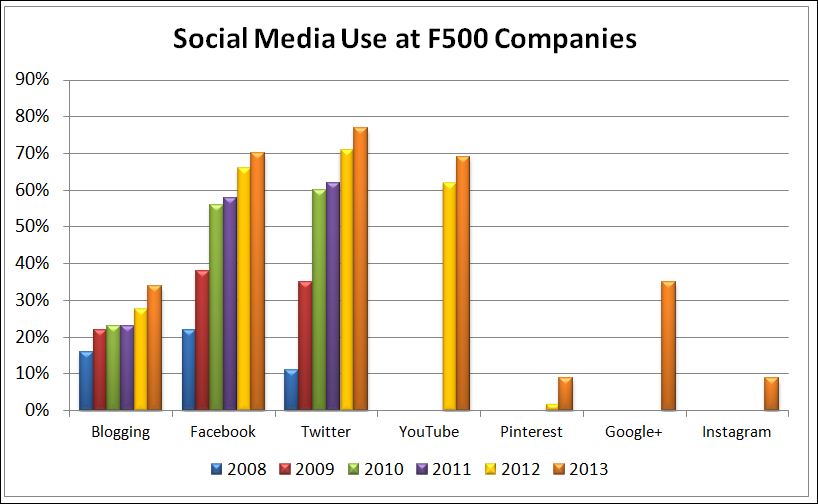
After several years bumbling around on social media, Fortune 500 companies are seemingly climbing aboard and approaching the usage levels of their more nimble INC 500 brethren.
That is one of the conclusions of a new report out of the University of Massachusetts Dartmouth Center for Marketing Research. The center has been conducting this type of research since 2008. A few of the report highlights:

Twitter on the rise

77% of the Fortune 500 companies have an active Twitter account, leading all other social media platforms. This is an increase over 70% in 2012.
The Wall of Shame: Five of the 2013 F500 companies had Twitter accounts with no activity on them: CF Industry Holdings, Joy Global, Laboratory Corp. of America, O’Reilly Automotive and Omnicare.

Corporate Blogs surging

In 2013, 171 companies (34%) had corporate blogs, showing the largest increase in use of this platform since the study began in 2008.
The F500 is still far behind INC 500 companies (44% have blogs), non-profits (63% have blogs) and universities at 66%.

Facebook up 4%

348 companies (70%) are now on Facebook. This represents a 4% increase since last year. Nine of the top 10 companies (WalMart, Chevron, Phillips 66, Berkshire Hathaway, Apple, General Motors, General Electric, Valero Energy and Ford Motors) have Facebook pages. Exxon does not.
The percent of corporations with Facebook pages varies by industry with Retail (96%), and Telecomm (88%) leading the way. Utilities (44%) and Automotive (40%) are laggards.

Google+ and others

Pinterest has grown in membership since its public debut in 2010 and is showing up in the F500. In 2012, 11 (2%) F500 companies had Pinterest accounts. This year that number has grown to 45 companies or 9%. Half of the top 10 ranked companies have Pinterest boards.
69% of the F500 have YouTube accounts, a 7% increase from last year. YouTube is as popular with the F500 as Facebook. Berkshire Hathaway is the only company ranked in the top 10 without its own YouTube channel.

Google+ was included in the study for the first time. Although 35% of the F500 have accounts, more than half of them are inactive. The university noted that this is the only platform where companies generally have accounts but no activity.
Any comments or surprises on this data?
 
Source: http://www.businessesgrow.com


Thursday, April 11, 2013

How to Use Custom Facebook Tabs for Marketing

If you're using a Facebook Page for business, are Facebook Tabs part of your marketing strategy?  The Tabs (or Apps as they're sometimes called) are the row of boxes under the Cover Photo that allow you to give your followers are better experience on your Page (only four show up in the top row but click the small arrow to the right of the boxes to see up to twelve).  Drive traffic to Tabs through your News Feed or your ads to make your campaigns more productive.

Promote Your Brand and Campaigns
Create a Tab that prompts visitors to "Like" your Page in order to download information, enter a contest or see a video. Use Tabs to make special offers that tie in with your current campaigns. I've seen restaurants drive traffic to a Tab that offers a free appetizer for all who "Like" their Page.  Link prospects directly to your custom Tab through your Facebook ads, Tweets or other social media posts.

As I did on my Facebook Page, use Tabs to build your email list. My "Join My List" Tab encourages all my Facebook visitors to sign up for my marketing tips emails. To encourage action on other social media pages, see how I set up a Tab that links to a sampling of my Twitter account and encourages people to follow me there too. 

Tabs can be used for almost anything.  See how brands like Coca Cola and Target use Tabs for creative ideas.

Check out applications such as ShortStack which let you easily create your custom Tabs to meet specific needs.  Or let us help you incorporate Tabs into your next marketing campaign.

Monday, June 25, 2012

Social Media Musts for your Trade Show Exhibit

Increase activity at your next trade show booth by incorporating social media into your exhibit marketing campaign. A press interview, increased traffic and even sales can all happen as a result!

Here are a few social media musts to incorporate into your pre-show plans:

1. "Follow" and "Like" the show/conference on Twitter and Facebook so you're in tune with all that's scheduled for the show especially any marketing/promotional activities for exhibitors.

2. Use and follow the show/conference hashtag (#) on Twitter. Use the hashtag in all of your Tweets related to the show. Periodically search on the hashtag to see what other exhibitors will be there and what the attendees are saying so you can be ready to meet their needs.

3. Finalize and schedule your show posts. Here are some suggestions of what to announce in your posts:

Reminders of your booth number and location
Scheduled dinners, cocktail hours, meet ups or other events for attendees
Special offers or promotions for show attendees

4. During the show, post photos or video of your exhibit, demonstrations or other activities! Continue to share useful information about what's going on at the show for those who couldn't make it.

Wednesday, February 1, 2012

Facebook 2012 Update: Summary of Mari's Smith's Webinar

If you didn't catch Facebook Expert Mari Smith's webinar yesterday on Facebook 2012, here are some of the high points to get you caught up.

Mari recommends that these "to do's" are on your daily Facebook checklist:
• Check your Business Page hidden posts (click on Wall to see them). These are typically spam but check here often so you don't miss an important message.
• Respond to comments and questions promptly (within hours not days).
• Check out Insights to see your page metrics. See which posts are being viewed the most and how many Engaged Users you have. Use this information to gauge what posts draw the most attention.

She threw out a lot of random tips such as:
• Try to "edutain" which is to provide quality content in a fun, engaging way.
• Use all of your other social media networks to grow your Facebook page.
• Short status updates have better engagement rates than longer ones.
• Increase your "shares" and it will increase your page's visibility.

Mari offered an interesting tidbit of what's coming soon on Facebook:
• One to one email capability to your fans (they're testing or rolling out this functionality in Asia now). This can really change the way businesses use Facebook to market directly to their followers.

Hope these help you to use Facebook more effectively for your business!

Monday, December 19, 2011

5 Reasons to Create a Facebook Landing Page

Have you created your Facebook landing page yet? Why do I need one, you ask? If you're serious about using Facebook to enhance your business, then a landing page can serve many purposes:

Introduce Your Business-

For people who aren't familiar with your business, a landing page can familiarize them with your products and services.

To Make Your Business Unique-

All Facebook pages tend to look very similar unless you take the initiative to customize your page. A landing page allows you to introduce your business to visitors the way you want to!

Reinforce your Brand-

Using a landing page, you can make your company and product brands highly visible. The profile photo just doesn't offer businesses enough to accomplish this but a landing page makes it easy.

Promote Events and Offers-

Change your Facebook Landing page to reflect your current offers or upcoming events.

Encourage the "Like" Button-

A landing page can explain why someone should like your page and what benefits they may receive: discounts, daily tips, links, photos or news. Encourage them with an explicit "like us" directive, similar to the one on my landing page (design by Ruzow Graphics).


For help with your business' Facebook page, call Jocelyn at 203.377.9980.